Gapless. Properly gapless.
Nanosecond-anchored scheduling on the same audio node. Live albums and DJ mixes flow without that little hiccup other players sneak past you. Rather have a crossfade? The next song fades in over the end of this one, and albums can still stay gapless.
CUE sheets, the chapters way.
Drop a cue sheet next to a single-file album rip and the track becomes chaptered: Previous and Next walk the cue points, the progress bar ticks each boundary, and the player bar names the current cue. No fake per-track entries cluttering your library.
Immersive Mode. Experimental.
Shift-Command-I opens a full-screen window with nothing on it but the music: the oscilloscope edge to edge, and three cards over it for the artwork and controls, the next ten songs, and synced lyrics. Esc brings you back. Experimental: the full-window visualizer is heavier than the side pane, so it may change shape or go if it proves too heavy.
Plays the awkward stuff.
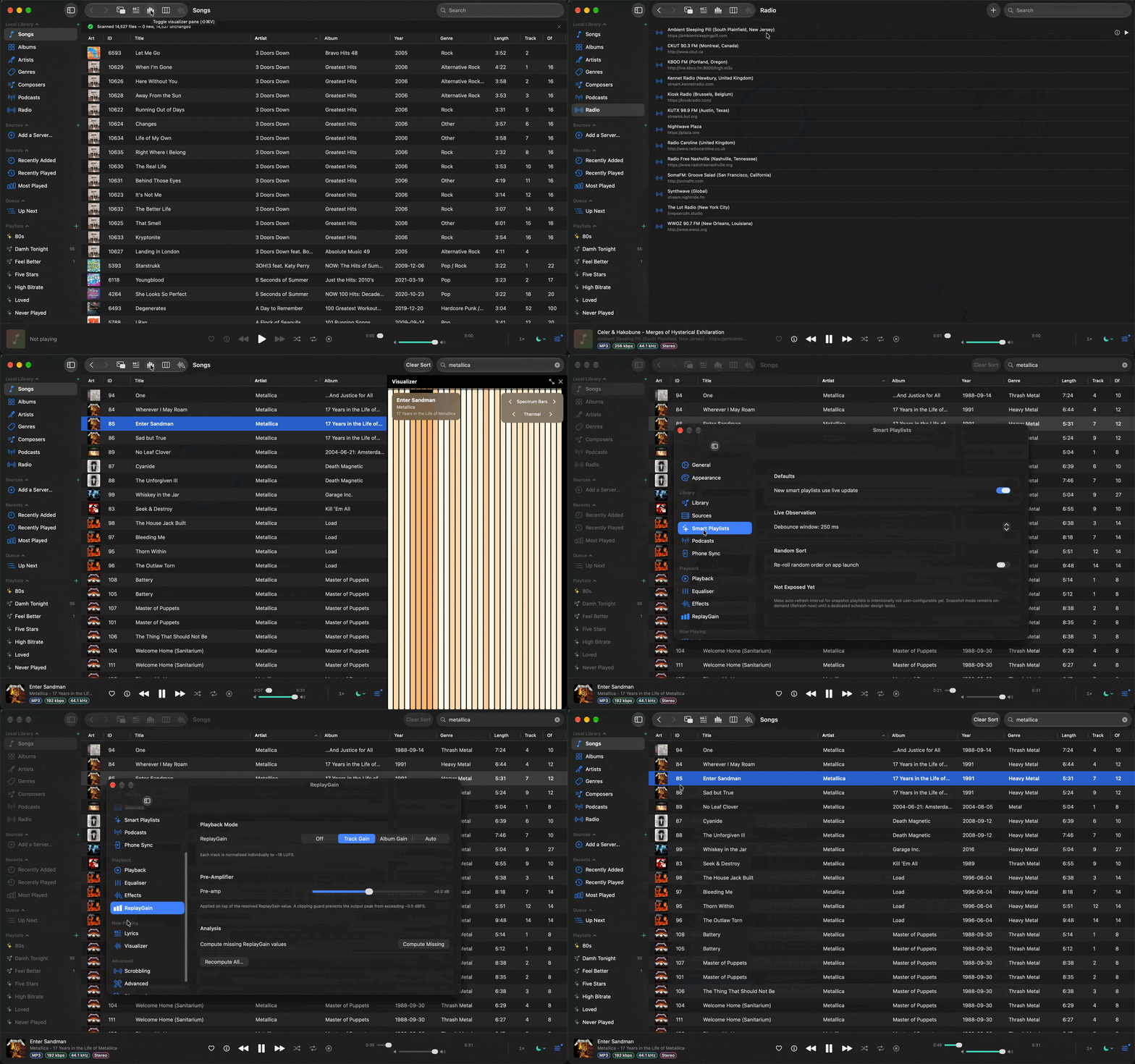
FLAC, ALAC, MP3, AAC, OGG, Opus, WavPack, Monkey's Audio, DSD, WMA, AC-3, E-AC-3, DTS, and more. The play bar tells you which one you are hearing: a row of small coloured boxes under the title for the codec, bitrate, sample rate, bit depth and channels, each with hover text explaining the fact, and the codec read from the decoder rather than guessed from the file name. See the full formats list.
Loudness that behaves.
ReplayGain applied as it plays, and measured in the background with EBU R128 when a file carries no tags. The analyser goes through the same decoders as playback, so the awkward formats get a number too, and a 5.1 mix is measured from the stereo fold you actually hear rather than from whichever two channels happen to sit first in the file.
Smart playlists with teeth.
Real predicates, not hand-wavy ones. "Played fewer than three times since 2019, rated four stars or higher, not in any other smart list." Done.
Tags it knows; tags you don't.
AcoustID fingerprinting hands you MusicBrainz IDs for that 64 kbps Limp Bizkit b-side from 2003 your friend insists is yours. Pick the exact release you own, then write Picard-compatible IDs, ISRC and totals back to the file. Artwork lands as JPEG, PNG, HEIC, or AVIF, and sidecar covers (cover.jpg and friends) are picked up straight from the folder. Right-click an album's cover to open it at full size.
Deep Dive on any artist, album or track. Off until you say so.
Get Info grows a Deep Dive tab: the artist's bio from Wikipedia, members past and present with their years and instruments, a discography with the albums you own ticked; an album's label, catalogue number, format and the releases around it; a track's writers, ISRC, first release and every release it appears on. Untagged artists are matched by name and confirmed with one click. The slow one-off artist lookup shows its progress above the library while it runs. Cached for a week, readable offline, built on MusicBrainz. Off by default: nothing is sent to MusicBrainz or Wikipedia until you turn it on in Settings > Library.
Mini-player that doesn't lie.
Stays on top, sized like a Winamp window, with a real spectrum analyser. No fake Apple-Music-style "oscilloscope". Reads the actual signal.
Visualisers that watch the signal.
Six GPU visualisers on Metal: spectrum bars, oscilloscope, a breathing Halo ring, a Cascade spectrogram, a Starfield warp field, and a Nebula gas cloud that churns with the bass and ripples on every beat. Moving them onto the GPU frees the CPU for the audio and keeps them smooth at Retina resolution, so Nebula's churn is a live shader, not a looping texture. Dockable or full-screen, six colour palettes, locked to the audio you're actually hearing. Hover to switch mode or palette right on the visualiser.
Lyrics, scrolling, synced.
LRC files, embedded lyrics, or fetched from LRCLIB if you turn that on. Karaoke-style line highlight. Toggle a translucent lyrics pane next to the queue.
Cross-fade the mood.
Fade one song into the next, anywhere from 0 to 10 seconds, on equal-power curves. Albums can stay gapless while everything else blends. You set it once.
Scrobbles only when you say so.
Last.fm, ListenBrainz and Rocksky, opt-in, batched, signed. No background telemetry, no "anonymous usage stats". Bòcan never phones home.
Plays your other library too.
Subsonic, Navidrome, Airsonic. As many servers as you like, federated search across the ones you include, per-server status dots, offline banners with one-tap retry, and ⌘⇧1–⌘⇧9 to expand or collapse a server in the sidebar. Plays through the same gapless engine as your local files.
Podcasts that keep up.
Subscribe by URL or search Podcast Index and Apple. Grab one episode, a batch for the flight, or auto-download new ones per show. Select a run of episodes and mark them all played, or unplayed again for a re-listen. Podcasting 2.0 where the feed bothers: clean show notes from the player bar, jump-to chapters, transcripts, host and guest credits, and publisher-recommended shelves. Variable speed, skip buttons, and it remembers exactly where you stopped. A Continue Listening rail keeps every half-finished episode one click from resuming, across all your shows. Flip to Downloaded and every episode you have saved, from every show, sits in one list: group it by show, sort it by any column, and Play All queues the lot in order.
Radio, without the tab clutter.
A proper station catalog: add streams by hand, or hand Bòcan a .m3u or .pls dial and it lifts every station out, names and all. Now-playing titles arrive live from the stream, and the info button tells you what you're really hearing: codec and profile, sample rate, channels, claimed bitrate. Streams reconnect on their own, and station idents never touch your scrobbles.
Your library, pocket edition.
Pair an Android phone with a six-digit code and Bòcan serves your music over your own Wi-Fi. Everything or just the playlists you pick, podcasts optional. Choose a quality and big files convert on the way over: a lossless library rides along as MP3 or Opus at a fraction of the size, originals untouched. Mutual pinned TLS, read only, one way, no cloud in sight. How Phone Sync works.
The Homer of music players.
Every cool feature from iTunes 9, Winamp 5, Foobar2000, and Cog. Without the bloat, without the spyware, without the cloud.
A log console you can actually read.
Open Help → Log Console (⇧⌘L) to tail every debug, info, warning, and error line since launch. Filter by level or category, search free-text, pause, copy, and export to a .log file. No terminal required.
Feels like it belongs on a Mac.
A tiny trackpad tick when you love a track, set a rating, land a seek, or release the volume slider. The Mini Player cross-fades with the main window instead of blinking. Control Center's Now Playing card shows the real album art. Honours Reduce Motion and your trackpad's haptic settings.
Browse the way you think.
Sort Albums, Artists, Genres, Composers, and Podcasts by name or by the count that matters: songs, albums, year, unplayed episodes. Flip Artists, Genres, and Composers between a list and a grid of cover-art cards, and browse any genre or composer by its albums. Filter Artists down to album artists only, and a thousand one-song guest credits get out of your way. Double-click any album cover and it just plays; single click opens it. Start typing anywhere and the first letter lands in the search box, query already underway, and it filters every view: Genres, Composers, Radio, and Podcasts included, right down to the Continue Listening rail. It understands release years too: type 1984 and the album gallery filters to that year's releases, or 2004-06 to narrow to a month, without touching your sort order. Your choices stick across launches, and every list remembers its place: scroll halfway down, open an album, hit back, and you land exactly where you left off.
Back means back.
Toolbar chevrons, ⌘[ and ⌘], mouse thumb buttons, and Esc all walk your browse history like a browser. Coming back restores your scroll position and your search filter, so stepping out of an album lands you exactly where you were, still filtered, text intact. And with nothing left to step out of, Esc clears the filter itself and drops you back where you were before you started typing.
A library that audits itself.
Tools → Library Summary: six tabs of honest answers. How big it all got, what needs fixing (every offender one click from its album), a spectral scan that catches "FLACs" laundered from lossy sources, the decades you own laid against the decades you actually play, your Last.fm history matched into skip rates and a when-you-listen heatmap, and a podcast backlog reckoning with one confirmed click to clean it up. Everything computed locally. Nothing leaves your Mac.
Your listening, one line per play.
History, under Recents in the sidebar, lists every song you have played, newest first, with when you played it. Bòcan kept this record from the first day; now you can read it, and if you have imported your Last.fm history the listens that match your library sit in the same list, back as far as your scrobbles go. Double-click a line to play the song again.